Put your voice side by side with native speech.
Shadowing is a shadow recording app for Mac and Windows. Drop in any audio and it transcribes it into timed sentences—running locally on your Mac. Loop any sentence, slow down without changing pitch, and expand AI explanations when you're stuck. Then speak along: your recording aligns side by side with the original waveform, showing how close you are in timing and pace at a glance.
The Windows installer isn't code-signed yet. If SmartScreen appears, click “More info” and then “Run anyway” (install guide).
No install required. Try a sentence right here.
The built-in sample story, Gon, the Little Fox (ごんぎつね). Click any sentence to loop it, slow down without changing pitch, or hit Shadow to hear the original first, speak when it's your turn, and compare.
Audio: LibriVox, read by ekzemplaro (CC0). Sample explanations are pre-written; in the app, they are generated by your configured AI. Recordings stay strictly inside your browser and are never uploaded.
Any audio you have becomes practice material.
Point the app to any folder with audio and start practicing. Subtitles load automatically; if you don't have them, Whisper transcribes everything locally on your Mac (or via cloud services on Windows), splitting by natural pauses and distinguishing speakers.
- Local transcription
- Whisper runs directly on your Mac, accelerated by Metal on Apple Silicon—offline, private, and completely free. On first launch, it checks your chip, memory, and disk space to recommend the right model. Prefer cloud speed? Groq and OpenAI are supported too. (Windows uses cloud services.)
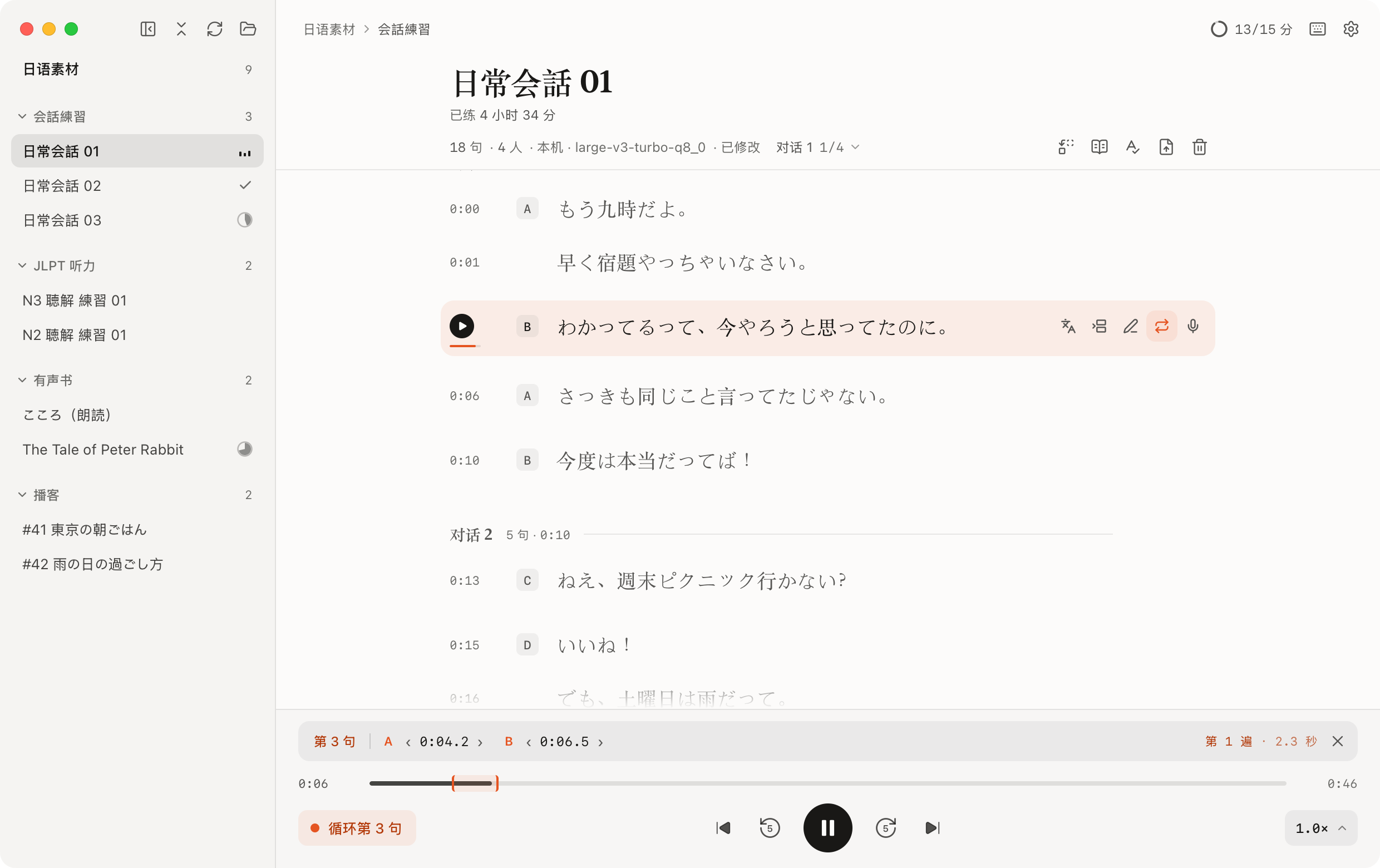
- Loop sentences, slow down pitch-perfect
- Click any sentence to jump right in. Press L to loop, [ ] to switch sentences, and track how many passes you’ve listened to. Adjust speed smoothly from 0.5× to 2.0× in 0.05 increments without changing pitch. For raw audio without subtitles, set A–B loop points with L.
- Conversation sections
- When an audio track contains multiple dialogues—like practice test questions—the app automatically splits them at long pauses or speaker changes. Rename or merge sections, loop an entire section, and jump between them with { }.
- Speaker diarization
- AB Clearly labels who said each line in a dialogue, with voiceprints calculated entirely on-device.
- Uncertain words
- Words the transcription isn't confident about are underlined with a dotted line, like 飴. Edit directly, find-and-replace across the text, or let AI proofread and suggest corrections—you stay in full control.
- Existing subtitles
- Matching SRT and VTT files alongside your audio are loaded automatically. Any edits stay inside the app without touching your original files, and playback position is saved for every track.

When a sentence trips you up, expand it for instant clarity.
Press I to reveal a full breakdown right under the sentence: translation, vocabulary readings, and grammar nuances—including informal contractions. Explanations are cached locally so they open instantly next time.
- Bring your own AI
- Sign in with your ChatGPT account or OpenRouter with a single click in your browser. Or provide an API key for OpenAI, Anthropic, Gemini, or DeepSeek—or run local models with Ollama or LM Studio.
- Completely optional
- Even without an AI service or subtitles, playback, looping, and shadow recording work flawlessly out of the box.
New in 0.7
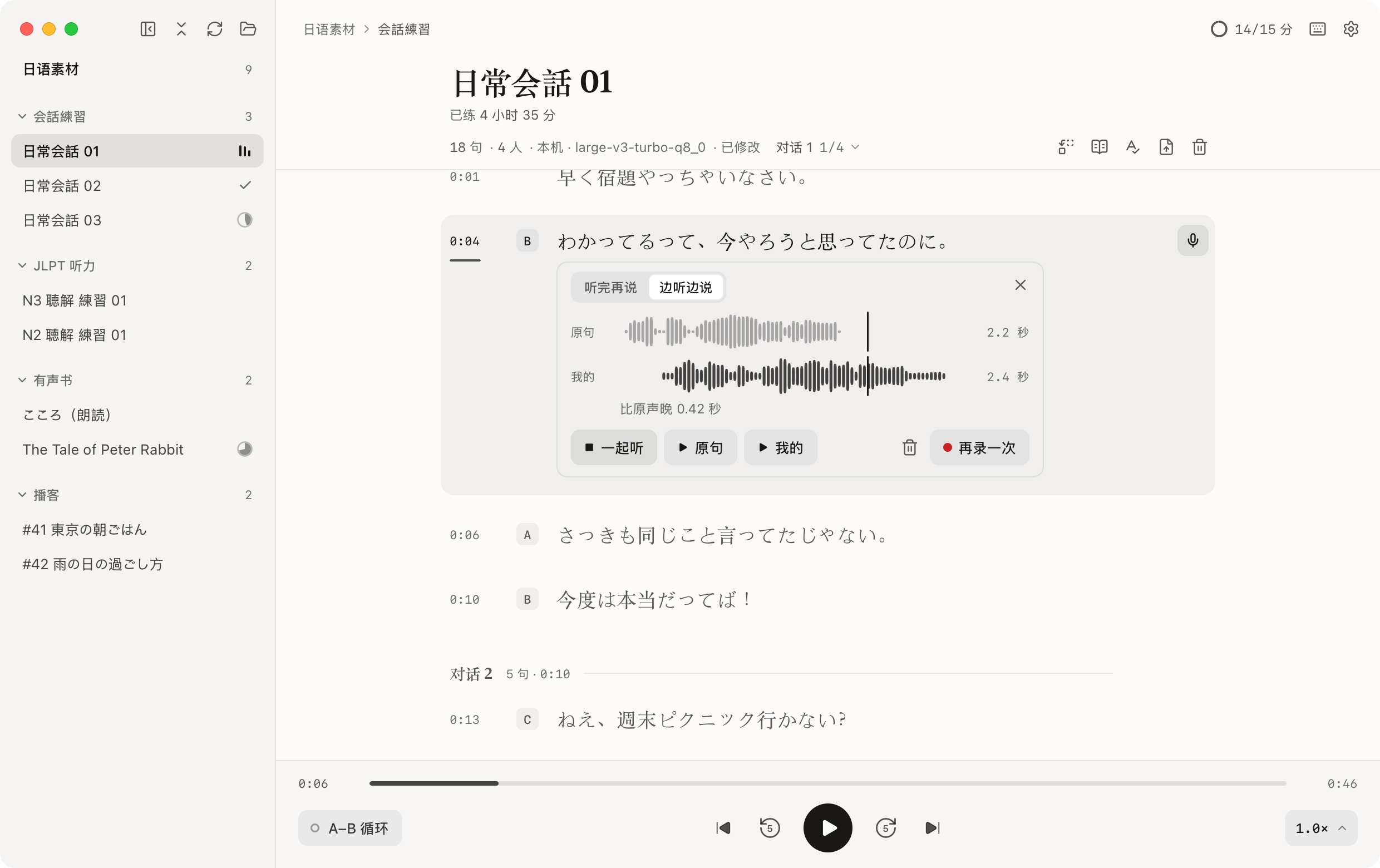
Then, it's your turn to speak.
Click the mic icon next to any sentence or press M to record. Works even without headphones: audio played from your speakers is automatically filtered out, preserving only your voice. Pause briefly when you're done, and recording stops on its own.

- Listen, then speak — or speak along
- Hear the original once before taking your turn, or speak simultaneously alongside native speech. Playback review is instant: listen sequentially (original then yours), or play both together to check your cadence.
- Two aligned waveforms
- See whether you're faster or slower, or how many tenths of a second you lag behind. Click either waveform to isolate that track, or press P to replay the last take.
- Built for AirPods & Bluetooth
- When using Bluetooth earphones, the app can record through your Mac's built-in microphone so your audio playback maintains pristine stereo fidelity instead of dropping into low-quality headset mode.
- Continuous recording
- Read an entire section or whole passage in one continuous flow. In solo mode, text highlights follow your voice, jumping to the next sentence when you pause. Or read along with the original audio. Once finished, your recording is automatically sliced by sentence for side-by-side comparison.
- Plays like lyrics
- Whenever a sentence with recorded takes plays, your recording card opens seamlessly beneath it. Click “Together” to review the entire passage sentence by sentence.
- Every take preserved
- Takes are saved locally on your computer so you can review your history anytime. Check disk usage in Settings and clean up orphan recordings with one click if you remove source files.

Practice every day, watch momentum build.
Only real practice time counts. Set a daily goal, and the ring in the header fills as you work—turning into a green checkmark when you reach your target.
- Active practice tracking
- Listening, recording, and reviewing all count. Pausing for up to 90 seconds while studying explanations or shadowing in your head is counted too. Days reset at 4:00 AM, so late-night sessions stay on today’s tally.
- Goals and streaks
- Defaults to 15 minutes, configurable from 5 to 60. A 14-day bar chart and 6-month activity calendar let you see your consistency at a glance.

New in 0.9
What the core app doesn't do, plugins can.
Plugins extend Shadowing with superpowers anyone can write. The first official plugin, “YouTube Import”: copy a video link anywhere, press ⌘V in the app, and pristine audio plus human-made subtitles download straight into your library. Want to shadow while watching? Download the video track too.
- Paste link to import
- Preview title, duration, and human subtitles before choosing your destination subfolder. Keep practicing other tracks while downloads proceed in the background. Audio is saved as the original untranscoded m4a track; video combines pristine H.264 visuals and audio into mp4 without re-encoding or requiring ffmpeg.
- Anyone can build one
- A plugin is just a standalone executable and a manifest.json communicating over stdio via JSON-RPC—just like LSP or MCP. Write in any programming language you like. If a plugin crashes or hangs, the core player stays rock-solid.
- Sandboxed and transparent
- Plugins never get direct access to your audio library. They only write to a temporary staging directory, which the app inspects before importing. Before installing, permissions clearly state which network endpoints it reaches and what binaries run. All registry plugins undergo source review.
Anki export and dictionary lookup plugin slots are in the works.
Your audio and voice stay on your computer.
Speaker separation and acoustic echo cancellation run entirely on-device; on Mac, transcription can run completely offline too. Aside from checking for updates and sending feedback you write yourself, network requests only occur when you invoke AI features (or cloud transcription on Windows) or plugins.
- Accesses only folders you select. Beyond the bundled sample, the app never touches any other files on your disk.
- Zero telemetry. No usage analytics, trackers, or telemetry. Settings clearly disclose where prompts are sent for every AI service.
- API keys stay in your system credential vault (macOS Keychain or Windows Credential Manager). App data only stores masked hints like
sk-…abcd. - Local models download only when needed. Pinned to fixed release versions and verified against SHA-256 checksums.
20 releases in 23 days. Evolving fast.
When a new version lands, the app lets you know on launch. One click on “Update and reopen” installs it smoothly, preserving all your settings, subtitles, and practice takes.
- 0.17
Hide the text. Shadow by ear, without reading along.
- 0.16
Media keys and headphone buttons. The keyboard's ⏯ ⏮ ⏭ and your headphones' buttons now control shadowing, even while you're in another app.
- 0.15
Pause to repeat. Each sentence plays, then pauses so you can say it, then the next one plays on its own.
- 0.14
Plugin annotations. Plugins can now annotate subtitle sentences directly. The first is the Japanese Furigana plugin, displaying readings over kanji.
- 0.13
Video support. Play mp4 and mov files with speed controls, looping, and shadow recording. Side-by-side or theater layouts, subtitle masks, dubbing mode, and YouTube video downloads.
- 0.12
Word-by-word highlights. Transcribed subtitles now highlight word by word (character by character in Japanese and Chinese) in sync with playback.
- 0.11
Windows release. 64-bit Windows 10 and 11 support with native playback, looping, and shadow recording using Ctrl shortcuts and cloud transcription.
- 0.10
English interface. Matches system language by default; switch freely between English and Chinese in Settings.
- 0.9
Plugins & YouTube Import. Paste links to import audio and human subtitles into your library; sentence explanations broken down by components with tone notes.
- 0.8.1
View What’s New release notes directly inside the app.
- 0.8
Custom sentence splits and multi-pass recording. Sentence drill mode; Deck play button pauses and resumes recording and playback.
- 0.7
Shadow recording & continuous sections. Record your voice against native speech without headphones; read whole sections in one go, automatically sliced into sentences.
- 0.6
Conversation sections. Multi-dialogue audio automatically divided into sections with renaming, merging, and section looping.
- 0.5.1
Fixed redundant Keychain permission prompts after updates.
- 0.5
Onboarding guide. Hardware-based local model recommendations and downloads, browser login for AI, and new .dmg installer.
- 0.4
Practice log & daily goals, plus in-app automatic updates.
- 0.3
Slimmer app bundle, reliable state saving, and eliminated timeouts on long AI proofreading.
- 0.2
Play order controls: repeat all, repeat one, and stop at end.
- 0.1
Initial public release.
Read the full changelog, or star the repo on GitHub to be notified when the Linux release arrives.
Installation
macOS requires Apple Silicon (macOS 11+); Windows requires 64-bit Windows 10 or 11. First launch features a simple 4-step onboarding: choose your target language, set up transcription (with a recommended local model download on Mac), connect an AI provider, and try the sample practice. The middle two steps can be skipped anytime.
macOS (Apple Silicon)
Download installer
Download the latest release (~11 MB).
Drag to Applications
Open the downloaded .dmg and drag Shadowing into your Applications folder.
-
Gatekeeper or “App is damaged” prompt
The app is not yet notarized by Apple, so macOS may show a warning or say the file is “damaged” (it isn't). Press ⌘ Space to open Terminal, paste this command, and press Enter to install and launch directly:
curl -fsSL https://shadowing.nihongo.day/install.sh | bashYou can also use this one-liner to install directly without downloading the .dmg manually.
Automatic updates
The app notifies you when updates are ready. Review release notes and install with one click. Release binaries are cryptographically verified before launch.
Windows (x64)
Download installer
Download for Windows and double-click to run. Installs to your user profile without needing administrator privileges.
“Windows protected your PC”
The installer isn't code-signed yet, so SmartScreen may prompt you: click “More info” and then “Run anyway”.
Automatic updates
Just like macOS, the app notifies you when new releases arrive and updates in one click. (Windows transcription uses cloud services such as Groq and OpenAI; local Whisper runs on macOS.)

Pick one sentence today, and loop it until it clicks.
Then record your take and hear how you measure up against native speech. Set a 15-minute daily goal and start today.